How to Choose an Event Photo Sharing Platform: Fast, Accurate, Simple
Thambi Selvam · Last updated: · 5 min read
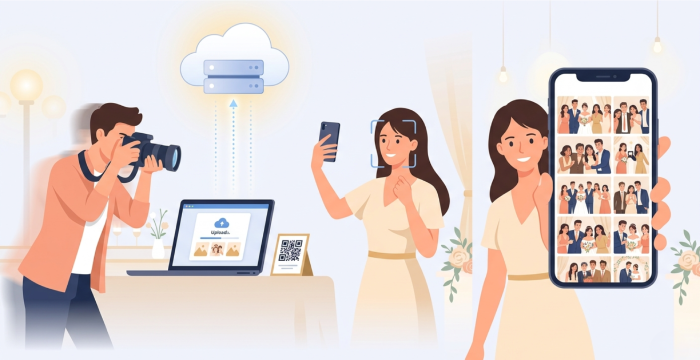
A good event photo sharing platform passes three tests: it is fast, accurate and simple. Fast means guests get their photos instantly after you upload them. Accurate means AI face recognition sends each guest only their own photos. Simple means guests just scan a QR code and take a selfie, with no app or account.
At Photomall we call this standard Fast • Accurate • Simple. It is trusted by 100K+ photographers across 360K+ events and by the Parliament of India for the CSPOC conference. This guide explains each test so you can pick the right platform for your studio.
Event Photo Sharing Platform vs Google Drive vs WhatsApp Groups
| Test | Google Drive link | WhatsApp group | Photomall |
|---|---|---|---|
| FAST | Upload the whole album first, then share the link. Wedding albums can take hours. | Photos are sent by hand in batches. “Send my photos” requests go on for days. | Guests get their photos right after upload. Nobody has to forward anything. |
| ACCURATE | Guests scroll through hundreds of photos to find themselves. Many give up. | Photos get buried in the chat. Late joiners miss them. | AI face match finds each guest’s photos, with up to 99.9% accuracy. |
| SIMPLE | Everyone with the link sees every photo. Guests may need to sign in. | Everyone in the group sees every photo. Someone has to set up and manage the group. | Guests see only their own photos. No app or account needed. |
Fast: Photos Reach Guests During the Event
Fast means how soon a guest gets their photos. A fast platform delivers photos during the event, not days later.
Live upload during the event
Photomall's Event Manager app uploads photos live while you shoot. Guests can find their photos before the event ends, while the excitement is still high. Our live photo sharing guide shows how to set it up.
Instant delivery after upload
Forget USB drives, delayed links and endless waiting. Guests scan a QR code at the event, upload a quick selfie and receive only their own photos instantly on their device. Photos are delivered as soon as you upload them, during or after the event, so clients never wait days for their memories.
Delivery tracking for every guest
Photomall shows how many photos matched each guest. If a guest says their photos never came, you can check their match count and reply right away.
Accurate: AI That Works at Real Events
A demo is easy. A live event full of people is tough. A good platform must find the right faces in real conditions.
Four hard cases the AI must handle
A selfie photo search should work well in all four:
Low light
Stage shows, evening receptions and dance floors.
Side angles
Candid shots where guests look away.
Crowds
Group photos with many faces in one frame.
Outfit changes
A bride in many looks across different functions.
Photomall's AI is built for real event conditions with up to 99.9% face recognition accuracy. That is why studios trust face recognition photo sharing for big weddings and large events. Guests never search through thousands of images and every person receives only the photos that belong to them.
Private gallery in full HD
Each guest gets a private event gallery with only their own photos. No one sees strangers' pictures. Photos are delivered in 4K-optimized HD quality so they stay sharp for sharing and posting. Read more about secure event photo sharing.
Simple: Easy for Guests and Your Studio
For guests
Guests scan the QR code, take a selfie and get their photos. Viewing and downloading is smooth and instant. There is no app download, no account and no password.
Tip: Put the QR code where guests wait, eat or relax. Learn where to place QR codes at an event to get more scans.
For your studio
Quick setup and fast uploads
No technical expertise or training required. Set up in just 2 minutes.
Studio branding
Your own domain or subdomain on every gallery.
Watermark
Your logo or image overlay on every photo.
Instagram Follow to View
Guests follow your page before they can view their photos so you gain followers with every gallery.
Live Photo Display
The photographer uploads event photos and guests see their photos on a big screen at the venue.
Count-based storage
You pay by number of photos, not by GB.
Local language support
Guest gallery in English, Tamil, Hindi, Malayalam, Kannada, Telugu, Marathi and Urdu.
Frequently Asked Questions
Try the Smart Way to Share Event Photos
Photomall is Fast • Accurate • Simple and it is built for photographers and event organizers. See how AI photo sharing works at your next event.
Good event photo sharing should make guests smile, not wait. Try it at your next event and see the difference.