AI Photo Sharing Software for Photographers
Photomall helps photographers deliver every client and guest their own photos in seconds. Guests upload a selfie, AI face matching finds their photos and your studio branding appears on every image.
Try AI Photo Sharing Now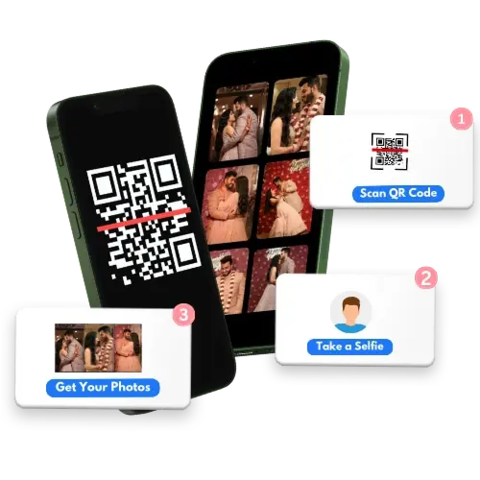

Fast, Accurate & Easy QR Code Photo Sharing with Photomall AI
Photomall offers AI-powered QR code Photo Sharing Software that delivers photos quickly and accurately even at large events like weddings, school functions, corporate events, political events, college fests and more.
No more manual work. No mix-ups. Just smart photo sharing software for photographers and a smooth experience for your clients.

How Live Photo Sharing Works During Events
Live Photo Sharing makes your event experience faster and more exciting. With Photomall, photos are uploaded instantly during the event, allowing guests to receive their photos in real time without waiting until the event ends. From scanning the QR code to receiving photos on mobile, everything happens automatically using AI-powered face recognition. Guests don’t need to search through hundreds of photos, they get only their own photos instantly.
👉 Want to understand the full step-by-step process?
Read the step-by-step guideImage Overlay: Automatic Event Branding on Every Photo
Running a marathon, corporate event or large-scale gathering? Make sure every photo your guests download carries your brand.
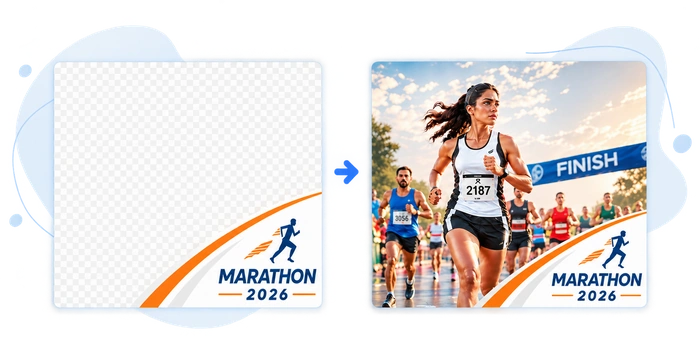
With Photomall's Image Overlay feature, event organizers can upload their own branded frame (logo, sponsors, event name) and it's automatically applied to every photo before guests download it. Image Overlay works for both portrait and landscape photos, so your branding looks right on every shot. No design software, no manual editing, no extra step for your team.
How it works
- 1Go to Event Settings → enable Image Overlay
- 2Upload your transparent PNG overlay, with separate versions for landscape and portrait photos
- 3Publish the event
Best suited for
- Marathons & running events
- Corporate events & conferences
- College fests & convocations
- Any large-scale event where sponsor/brand visibility matters
How AI Photo Sharing Helps Your Photography Business
Show Your Photography Talent
Let everyone showcase your professional photography skills with smart AI photo sharing.
Attract More Photography Clients
Boost your brand and attract more bookings with AI-shared professional photos.
No More Phone Pics
Guests get instant access to your professional photos, no phone pics needed.
Grow Your Photography Studio
Grow your studio and boost brand visibility as guests remember your name.
Turn Shared Photos Into New Clients
Turn your photos into a marketing tool that converts viewers into clients.
Increase Your Photography Income
More visibility means more bookings and extra income for your photography business.
Want to turn every shared event photo into a marketing opportunity? Discover how AI-powered photo sharing boosts brand visibility and helps photographers attract more clients after every event.
Boost Your Photography Brand Visibility →Simple for photographers. Effortless for guests.
For Photographers
Create Event
Create an event for that particular user.
Place the QR Code
Place the QR Code in a visible spot for guests. Promote photography business using QR code
Upload Photos & Make Live
Our Event Manager App auto detects and uploads the photos.
For Event Guests
Scan QR Code
Event guests will scan the QR code.
Upload a Selfie
Event guests will login and upload their selfie.
Get Photos
They will receive all their event photos.
Memorable Moments with AI-Powered QR Code Photo Sharing
Discover how our instant AI-Powered QR code photo sharing makes their memories unforgettable.
Simple, smart and super fast! Photomall made photo sharing feel effortless, perfect for photographers and clients who value time and quality.
Smile Pleaze Photography
Photomall has helped me a lot with instant photo sharing. It has made my work easier, I am able to send photos to clients easily and the Photomall team is also very friendly.
Photobox Photography
I used Photomall’s photo-sharing service for a wedding and it was a great success. My customers were very happy with the experience and it helped my business reach more people. Thanks to Photomall!
Kaviyam Digital Studio
Frequently Asked Questions
What is Photomall's AI photo sharing software for photographers?
How accurate is face recognition?
Do I need a large amount of internet to share photos live?
Do guests need an account to view photos?
Note: Guests need to enter their mobile number or email ID to receive notifications when AI matches their photos.
Is the Photos and other data private and secure?
Is there a free trial or refund policy?
How does Photomall's AI Photo Sharing feature benefit photographers?
How can I upload photos during a live event?
In what quality are the photos compressed while uploading?
Can I customize branding and watermarking?
How long does the face matching and delivery take?
What events is this best suited for?
In what quality are the photos delivered to guests?
Read: Why Photomall Uses 4K Instead of Original Photos