Live Photo Sharing for Photographers: Complete Guide to Instant Event Photo Delivery
Last updated: · 2 min read
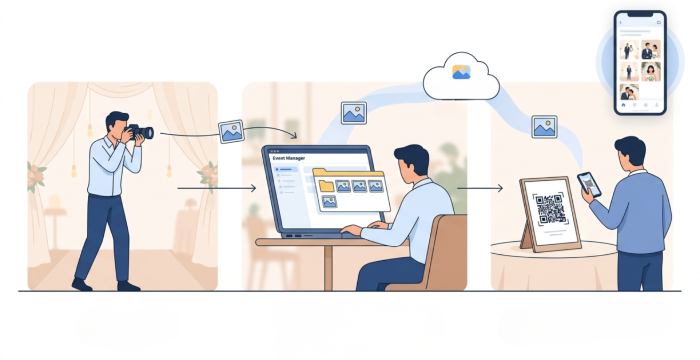
Your event photos reach guests within minutes of clicking the shutter, no waiting until the next day, no manual transfers, no confusion. It works in two simple stages.
Part 1: Camera to Device Transfer
The first step is getting photos from your camera to your phone, laptop, or desktop — automatically, as you shoot. Every major camera brand has its own solution for this.
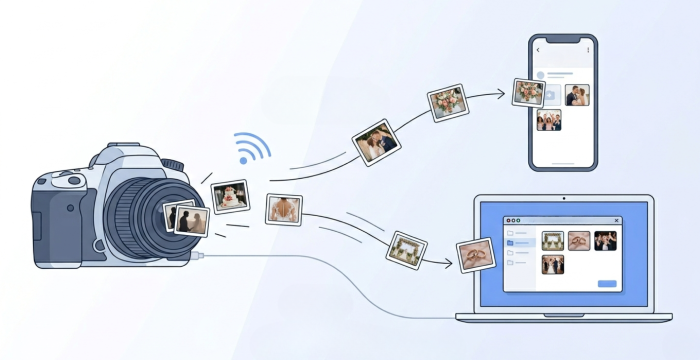
| Brand | Mobile App / Method | Laptop/Desktop Method |
|---|---|---|
| Sony | Imaging Edge Mobile — wireless transfer, manual or quick selection | Imaging Edge Desktop — tethered mode, auto-saves as you shoot |
| Canon | Canon Camera Connect — pair via Wi-Fi, auto-transfer on supported cameras | EOS Utility — USB or Wi-Fi tethered shooting, real-time import |
| Nikon | SnapBridge — full-resolution images over Wi-Fi, auto or manual download | N/A (use USB import) |
Part 2: Device to Photomall Server
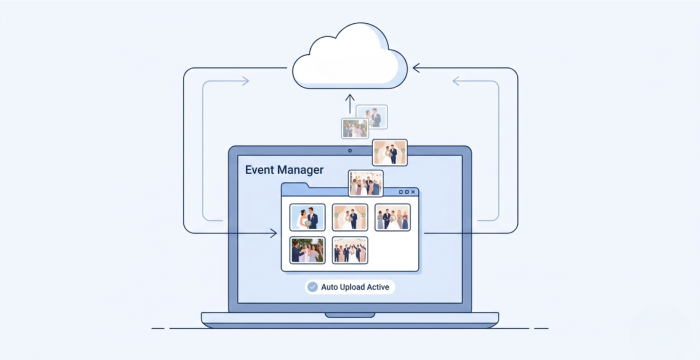
Fully automatic. Once your photos land in the device folder, Photomall's Event Manager takes over — watching that folder and pushing every new photo straight to the Photomall server instantly.
How to Set It Up
Step 1: Install Event Manager: Available on Windows, Mac and Android mobile devices.
Step 2: Select Your Folder: Open Event Manager and point it to the folder where your camera app (Canon Connect / SnapBridge / Imaging Edge) is saving photos.
Step 3: Sit Back and Shoot: Every photo that lands in that folder is automatically detected and uploaded to Photomall's server. No buttons to click. No file transfers to manage. Just shoot.
Using Multiple Cameras
Photomall doesn't directly limit the number of cameras. It works based on devices (mobile/laptop) and folders, so multiple cameras can work together without any issue.
How it actually works
- Each camera connects to a device (mobile or laptop)
- Each device receives photos and saves them into a specific folder
- Event Manager monitors that folder and automatically uploads every photo to Photomall
- All devices upload photos to the same event simultaneously
Each camera connects to a mobile or laptop and all devices upload photos automatically to the same event. So multiple cameras can work together without any extra configuration.
Live photo sharing is no longer a luxury
It's what modern clients expect. With the right camera app and Photomall's Event Manager, you can deliver this experience at every event, without adding any extra work to your day.